⏱️ Do It Now
Create a OneNote Page
Copy both the title and DIN task – then complete the DIN task:
Y9 – AU1.3 – Casting and Arithmetic
| 📝 Do It Now |
| Answer each of the following: (1) Explain the difference between initialisation and assignment (2) Describe how an fString works (3) Explain why programmers add comments to their code |
🛝 Lesson Slideshow
🎓 Lesson Activities
- Activity 1
- Activity 2
- Calculator
- Demonstration 1 Code
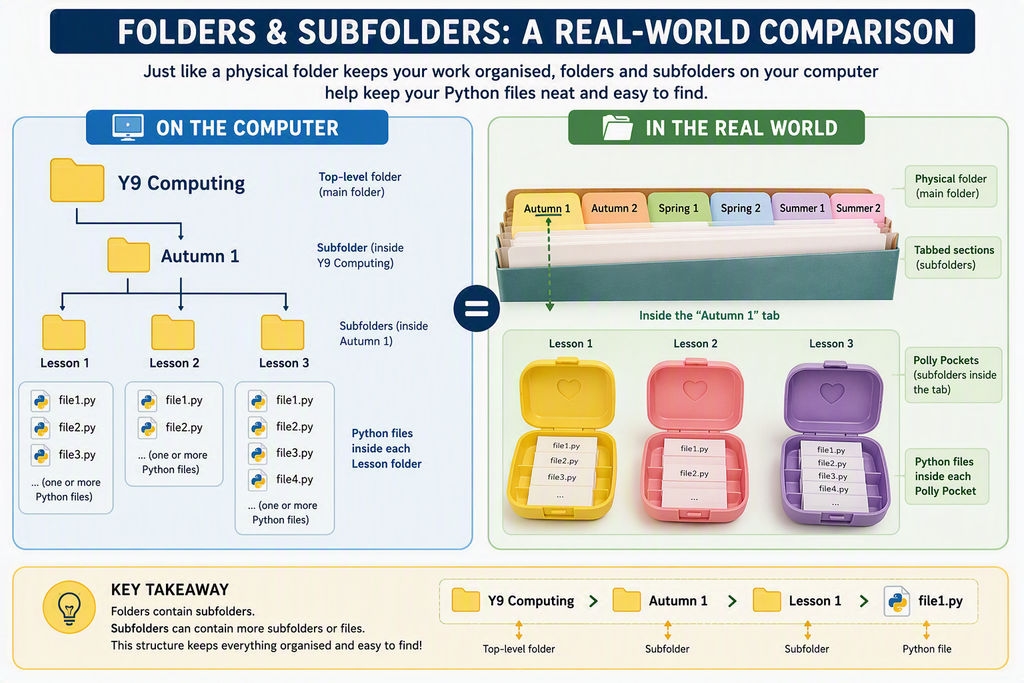
- Files and Folders Explained
⌨️ Activity 1 – Data Types Explained
-
Create a new subheading in OneNote called:
“Activity 1 – Data Types Explained” -
Explain what each data type is and what it is used for in programming.
To support each explanation, provide a suitable example.
Include the following data types:
- Integer (int)
- Float (float)
- String (str)
- Boolean (bool)
⌨️ Activity 2 – Casting Explained
-
Create a new subheading in OneNote called:
“Activity 2 – Casting Explained” - Screenshot the code into OneNote.
- Explain what is meant by casting.
- Explain which parts of the code are performing the casting.
- Explain what the original data type was and what data type it was cast to.
Success Criteria ✅
- I can explain what casting means.
- I can identify where casting takes place in the code.
- I can identify the original data type.
- I can identify the new data type after casting.
- I can use correct programming terminology.
⌨️ Activity 3 – Your Own Calculator
Now it is time to extend your code:
- Make your calculator program carry out each of the other arithmetic operations.
- Make sure you add suitable comments into your code to explain what is happening.
-
Screenshot your code and paste it into OneNote under the subheading:
“Activity 3 – Arithmetic Operations”
Success Criteria ✅
- I can use multiple arithmetic operators in my program.
- I can write meaningful comments to explain my code.
- I can test my calculator program successfully.
- I can organise my work in OneNote.
- I can present my code clearly with screenshots.
🎓 Demonstration 1 – Working With Arithmetic
Copy this code into the file called: AU1.3 – Casting and Arithmetic
#------------------- Global Variables -----------------------
num1 = 0 # Initialising (creating) num1 to use later in the program

num2 = 0 # Initialising (creating) num2 to use later in the program

answer = 0 # Initialising (creating) answer to use later in the program

#------------------- Main Program ----------------------------

num1 = input("Enter number 1: ")

num2 = input("Enter number 2: ")

answer = num1 * num2

print(f"{num1} X {num2} = {answer}")