Copy this title into a new OneNote document:
Y10 AU – CT6 – Flow Charts
(1) Copy the code below into a code cell in Jupyter
(2) Carry out the instructions given in the arrow comment blocks
(3) Write the title Do It Now onto the page
(4) Screenshot your completed code into OneNote
# Y10 AU - CT6 - DIN

#------------------- Global Variables ----------------------------

score = 0    # Initialising the score variable

#----------------------- Main Program ----------------------------

#====> Assign an input to score
#====> Make sure you cast it to integer
#====> The prompt should ask for a number between 25 and 50
score =


#====> Complete the selection sequence below so that
#====> It outputs valid range for any number between 25 and 50
#====> It outputs invalid range for anything else
if (           )     (           ):
    print("Score within a valid range")

else:
    print("Score within an invalid range")
🎯 Objectives:
(1) We will be able to identify the main symbols used in a flowchart
(2) We will be able to construct a program based on a flowchart
(3) We will be able to construct a flowchart based on a program
🔎 Analysing a Flow Chart
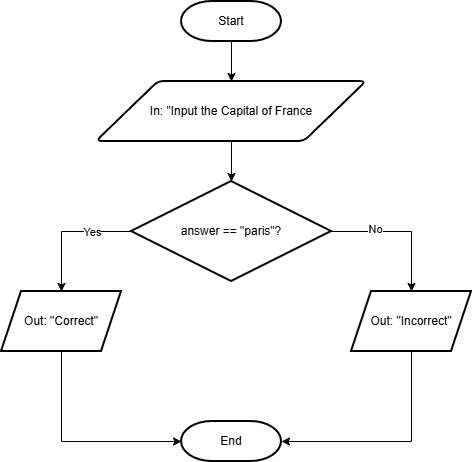
Look at the flow chart below:
(1) Can you describe the algorithm?
(2) Will it always have the same outcome?
(3) What makes this easy / difficult to represent in Python?
⌨️ Following an Algorithm
(1) Create a new folder called Y10 AU – CT6 – Flowcharts
(2) Make a file called Activity 1.py and save it to the folder
(3) Create a code version of the algorithm specified by the flowchart above
(4) Paste a screenshot of both the flowchart and your code side-by-side, with the subheading Activity 1
(5) Annotate the two screenshots, to highlight the differences and similarities
⌨️ Make Your Own Flow Chart
This time you will have to work out how to make a flow chart based on the code below.
Use either the graphics tablet to draw it into OneNote or use this website: Draw.io
# Activity 2 Code

#------------------------------ Global Variables -------------------------------

colour = ""

#-------------------------------- Main Program ---------------------------------

colour = input("Name a primary colour: ") # Prompting the user to input a primary colour


# A Branching Conditional Sequence that determies if the user has input a primary colour
if colour == "red":
    print("Correct")

elif colour == "blue":
    print("Correct")

elif colour == "yellow":
    print("Correct")

else:
print("Incorrect")⌨️ Further Flowchart Practice
(1) Work through the challenges below
(2) When coding flowcharts into Python make sure you create a new file for each program, and save it into the folder you made for today’s lesson.
(3) Use a naming setup like Activity 3a and Activity 3b etc
(4) Use either the graphics tablet to draw it into OneNote or use this website: Draw.io
⌨️ Activity 3a
Represent the following program as a flowchart
# Activity 3a Code

#------------------------------ Global Variables -------------------------------

states = ""

#-------------------------------- Main Program ---------------------------------

# Prompting the user to enter one of the three states of water
states = input("Name a possible state of H2O: ")


# A Branching Conditional Sequence that determies if the user has input a primary colour
if states == "solid" or states == "liquid" or states == "gas":
    print("Correct")

else:
print("Incorrect")⌨️ Activity 3b
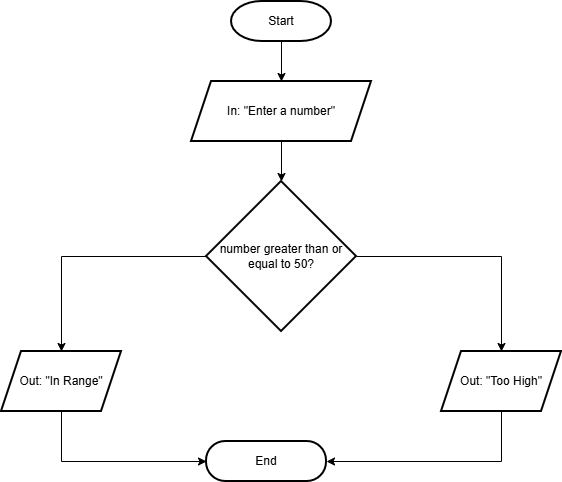
Code the following flowchart into Python – Using the standard layout for a Python file.
⌨️ Activity 3c
Represent the following program as a flowchart
# Activity 3c Code

#------------------------------ Global Variables -------------------------------

pword = ""

#-------------------------------- Main Program ---------------------------------

pword = input("Enter a choice of new password: ") # Prompting the user to input a new password

pwordLen = len(pword) # Gets the length of the user's password


# A Conditional Sequence that determines if the password is a valid length
if pwordLen >= 8 and pwordLen <= 20:
    print("Password is a valid length")

else:
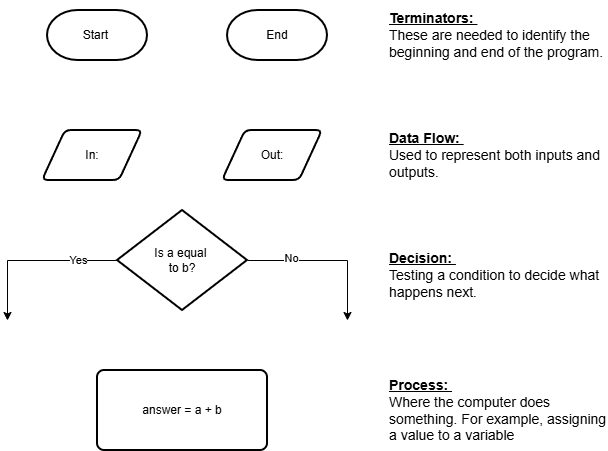
print("Password is an invalid length")You will use the following flowchart symbols throughout the GCSE course, and they are really worth memorising.
🎓 Mini Whiteboard App
(1) What shape is used for a terminator?
(2) What are the terminators?
(3) What shape is used for decisions?
(4) What two parts of a program can be represented by the data flow symbol (parallelogram)?
