Copy this title into a new OneNote document:
Y10 AU – CT10 – While True Loops for Validation
Complete this table and copy it into the OneNote document:
| ⏱️ Do It Now: |
| (1) Copy the code below into Jupyter: JupyterLite (2) There are at least three types of error throughout the code; that prevent it from running correctly. (3) Fix the errors and then copy the code to OneNote (4) Annotate the code in order to explain what the errors were and how you fixed them |
# Y10 AU - CT10 - DIN

#------------------------------ Global Variables -------------------------------

weather = ""

#-------------------------------- Main Program ---------------------------------

# While True loop used to validate the user input

while true

    print("Input the current weather")
    weather = input("Only type rain, cloudy, sunny: ")

    if weather = "rain"
        break

    elif weather = "cloudy"
        break

    elif weather = "sunny"
        break

    else:
        print("Invalid type of weather, please try again")
        print("")


# Conditional sequence to tell the user what to do

if weather = "rain"
    print("Take a raincoat")

elif weather = "cloudy"
    print("Wear a hoodie")

else:
    print("Wear sunscreen")
🎯 Objectives:
(1) We will learn how While True loops can be used within larger programs to validate user inputs
(2) We will be able to apply conditional loops and conditional sequences to make multi-stage programs
(3) We will create a multi-stage program from a flowchart and decide where to add suitable validation
⌨️ Activity 1 – Ordering a Drink
This program requests various pieces of data to be entered by the user.
Each piece of data is carefully validated before it is processed.
(1) Carefully run through the program
(2) Code it in Python
(3) Add your code to OneNote and annotate what occurs at each stage
(4) Create a flow chart based on the complete code and add it to OneNote
⌨️ Activity 2
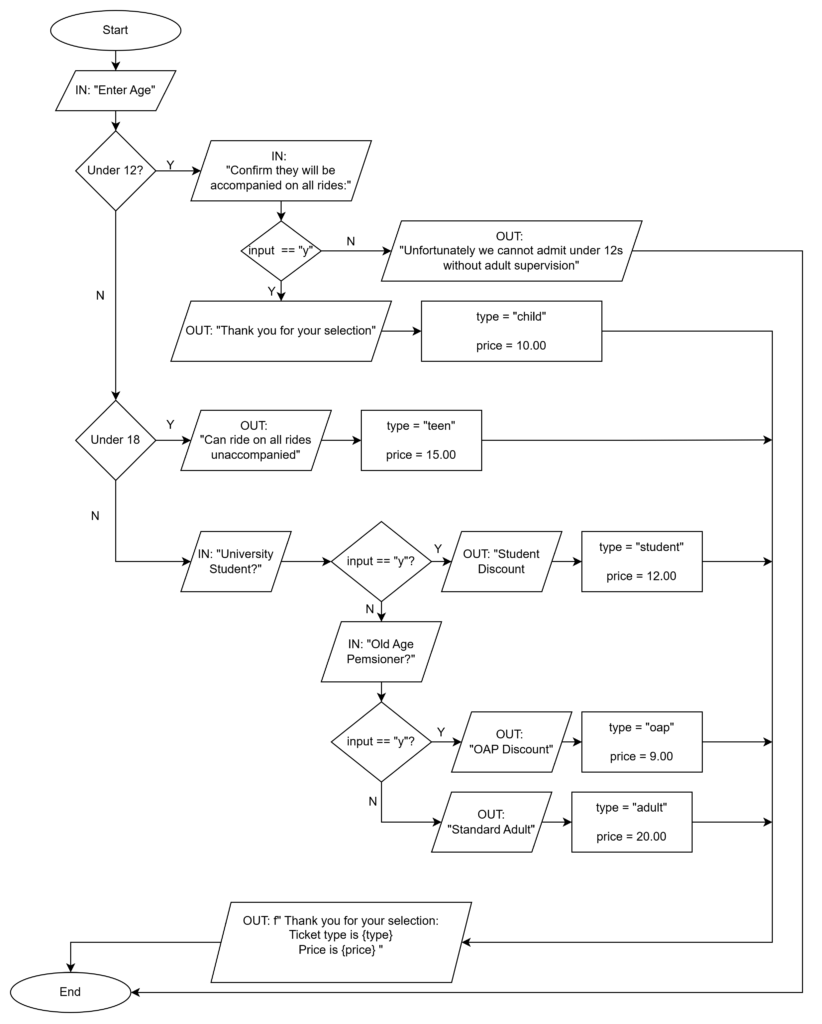
The flowchart below shows the checks for admittance to a theme-park ride based on age and height.
(1) Create this program in python
(2) Ensure you use suitable validation with While or While True loops
(3) Add the flowchart to the OneNote page
(4) Add your code to the OneNote page (below or adjacent to the flowchart)
(5) Annotate the code to explain what is happening
(1) Complete: Y10 AU1 - CT10 - End of Lesson Quiz
(2) Paste your result into the OneNote page
